


Open Enrollment Best Practices for Brokers: Setting up Payroll & Benefits Integrations
Managing open enrollment is complex enough; but when you add payroll systems, carriers, and TPAs into the mix, things can quickly become overwhelming.
That’s where 3rd party apps and integrations come in.
For brokers, effectively managing integrations during open enrollment is critical to ensuring accurate data, smooth workflows, and a successful enrollment experience for clients.
In this part of our Open Enrollment series, we’ll cover best practices for working with payroll and benefits integrations during enrollment.
This is Part 2 of Our Open Enrollment Series for Brokers
- Getting Enrollment Ready
- Setting up Payroll & Benefits Integrations (You are here)
- Managing Carrier, TPA & 834 EDI Integrations
- Reporting During Open Enrollment
- Closing Out Open Enrollment
Missed Part 1? Learn how to prepare for open enrollment
Why Integrations Matter During Open Enrollment
Integrations connect Employee Navigator with payroll providers, insurance carriers, and TPAs, allowing employee data to sync automatically across systems.
During open enrollment, integrations help brokers:
- Eliminate duplicate data entry
- Reduce errors between systems
- Keep payroll and benefits aligned
- Streamline workflows for HR teams
When executed correctly, integrations are a key driver of efficiency and accuracy during the busiest time of year.
Carrier & TPA Integration Best Practices
Each carrier and third-party administrator (TPA) may have different requirements during open enrollment. Preparing ahead of time helps avoid delays and errors.
Review Carrier-Specific Open Enrollment Requirements
Before enrollment begins:
- Check each carrier’s open enrollment guidelines
- Look for blackout periods or submission restrictions
- Confirm whether a census or additional data is required
Understanding these requirements upfront helps prevent last-minute surprises.
Renew Plans Instead of Rebuilding
Rebuilding plans from scratch can be time-consuming and increase the risk of errors.
Whenever possible:
- Use plan renewal features
- Carry over existing carrier structures
- Minimize manual setup work
This approach saves time and ensures consistency across plan years.
Audit Employee Demographic Data
Incomplete or inaccurate employee data is one of the most common causes of integration issues.
Before open enrollment:
- Run reports to identify missing demographic fields
- Confirm required data is complete for all employees
- Ensure records meet integration requirements
Clean data upfront leads to smoother syncing across systems.
Payroll Integration Best Practices
Payroll integrations play a critical role in ensuring accurate deductions and a smooth transition into the new plan year. Here are some suggestions from the Employee Navigator team that can help your payroll integrations go seamlessly.
Confirm Deduction Code Mapping
Deduction codes must be aligned between systems to ensure accurate payroll processing.
Before enrollment:
- Verify whether deduction codes have changed from the prior year
- Confirm mappings with your client’s payroll provider
- Avoid assumptions and always validate
Set Up Deduction Codes for New Plans
If new benefit plans are being introduced:
- Create corresponding deduction codes
- Ensure they are properly configured before enrollment begins
- Align codes with payroll system requirements
Proper setup prevents downstream payroll issues.
Choose the Right Send Deductions Date
The Send Deductions Date determines when enrollment data is transmitted to payroll, and timing is critical.
To ensure accuracy, this date should:
- Occur after the final payroll of the previous plan year
- Be at least one day after open enrollment closeout
- Fall before the first payroll processing date of the new plan year
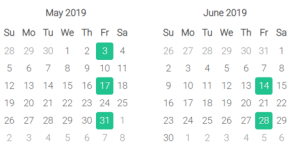
Example Scenario
For a bi-weekly payroll schedule:
- First pay date of the new plan year: June 14
- Payroll is processed: June 11
- Open enrollment close date: June 1
Recommended Send Date: June 2
This gives the client time to review deductions before payroll is processed.
Encourage clients to review deductions carefully after they are sent to ensure accuracy before processing payroll.
Avoid Accidental Employee Terminations
Integration issues can sometimes lead to unintended consequences, like accidental terminations.
For example:
- Employees moving between departments or locations may shift payroll entities
- Without proper communication, this can trigger a termination event
To prevent this:
- Ensure HR communicates employee changes clearly
- Verify how payroll handles transfers vs. terminations
- Keep employees active in Employee Navigator when appropriate
This helps avoid coverage gaps and ensures benefits remain intact.
Help Your Clients Run a Smoother Open Enrollment
Managing 3rd party integrations during open enrollment may seem complex, but with the right preparation, brokers can significantly reduce errors and improve efficiency.
By focusing on:
- Clean and complete data
- Proper payroll setup
- Carrier-specific requirements
- Clear communication with clients
You can help ensure a seamless enrollment experience across systems.
Continue the Open Enrollment Series
Once integrations are set up and running, the next step is managing the enrollment experience itself.